Narcis.ai: Production ML Systems Engineering
Technical Writeup - Infrastructure & ML Systems Engineering
Executive Summary
Narcis.ai is a production AI portrait generation system serving real users at narcis.ai. The system shows how infrastructure engineering provides the foundation for building ML systems. The live production system transforms user portraits into artistic interpretations through container orchestration, custom ML pipeline engineering, and real-time operational management.
Technical Scale & Activity
Production System Metrics:
- 237 commits across active development lifecycle
- 47,036 lines of code spanning Python ML pipelines, TypeScript web services, and Terraform infrastructure
- 198 Terraform resources managing multi-tier ECS orchestration, GPU capacity providers, and S3 storage architecture
- ~5,600 production artifacts generated through Discord bot and web interface, serving artistic transformations through a publicly available system
- 50GB+ model weights mounted via S3 for PhotoMaker V2 and SDXL inference
- ~20 seconds generation time on G6/G5 instances, ~40 seconds on G4dn spot instances
- Multi-million parameter identity preservation through differential diffusion and custom timestep scheduling
Document Structure
Page 1: Container Orchestration & Service Mesh Architecture
Infrastructure foundations - ECS cluster orchestration, multi-tier GPU capacity providers, service mesh networking,
and AWS resource management patterns that provide the reliability foundation for production ML workloads.
Page 2: ML Pipeline Engineering Deep Dive Technical implementation - Custom diffusion implementations, differential timestep scheduling, PhotoMaker identity preservation, and tensor operations that go beyond standard framework usage.
Page 3: Production Operations & Web Platform Deployment - Discord bot command interfaces, Remix React web platform, PostgreSQL session management, and unified caching systems that power the live user-facing application.
Page 1: Container Orchestration & Service Mesh Architecture
Built with distributed systems principles, the architecture shows how infrastructure knowledge extends to production ML workloads, implementing development velocity strategies while maintaining operational reliability.
┌─────────────────────────────────────────────────────────────────┐
│                        NARCIS.AI PRODUCTION SYSTEM              │
└─────────────────────────────────────────────────────────────────┘

                              ┌─────────────┐
                              │   Users     │
                              │ narcis.ai   │
                              │ Discord Bot │
                              └─────┬───────┘
                                    │
                     ┌──────────────┼──────────────┐
                     │              │              │
              ┌──────▼─────┐ ┌──────▼─────┐ ┌─────▼─────┐
              │  Discord   │ │   Web      │ │  External │
              │  Service   │ │   App      │ │    API    │
              │ 159MB/0.17 │ │ 1GB/1vCPU  │ │           │
              │    vCPU    │ │            │ │           │
              └──────┬─────┘ └──────┬─────┘ └─────┬─────┘
                     │              │             │
                     └──────────────┼─────────────┘
                                    │
                         ┌─────────▼────────┐
                         │ Service Discovery│
                         │    (ECS Connect) │
                         └─────────┬────────┘
                                   │
                    ┌──────────────┼──────────────┐
                    │              │              │
             ┌──────▼─────┐ ┌──────▼─────┐ ┌─────▼──────┐
             │   Mecene   │ │ Generation │ │ S3 Storage │
             │  Service   │ │  Service   │ │   Models   │
             │159MB/0.17  │ │16GB/4vCPU  │ │ Objects/   │
             │    vCPU    │ │   1x GPU   │ │Productions │
             └────────────┘ └────────────┘ └────────────┘
                                   │
                    ┌──────────────┼──────────────┐
                    │              │              │
              ┌─────▼────┐  ┌──────▼────┐  ┌─────▼────┐
              │G6.xlarge │  │ G5.xlarge │  │G4dn.xlarge│
              │(on-demand│  │   (spot)  │  │  (spot)  │
              │ primary) │  │ fallback  │  │ fallback │
              └──────────┘  └───────────┘  └──────────┘
The system’s defining characteristic is its “build locally, run remotely” philosophy - enabling 2-3 minute deployment cycles from local development to production GPU environments through Docker layer caching, S3-mounted model architecture, and automated ECS orchestration.
“Build Locally, Run Remotely” Development Architecture
Docker Layer Optimization Strategy
The system enables 2-3 minute deployment cycles to production GPU environments:
# generation/Dockerfile - GPU-optimized multi-stage build
FROM 763104351884.dkr.ecr.eu-west-1.amazonaws.com/pytorch-training:2.2.0-gpu-py310-cu121-ubuntu20.04-ec2 AS builder

# Layer 1: Dependencies (rarely change, cached)
COPY pyproject.toml .
RUN python -c "import toml; deps = toml.load('pyproject.toml')['project']['dependencies']; open('requirements.txt', 'w').write('\n'.join(deps))" \
    && pip install --no-cache-dir -r requirements.txt

# Layer 2: Source code (changes frequently, separate layer)
COPY . .
RUN pip install build \
    && python -m build \
    && pip install --no-cache-dir --no-deps dist/*.whl
S3-Mounted Model Architecture
Design decision: Models live on S3, not in containers
- 50GB+ Model Weights: Loaded at runtime from S3 mounts (
/models,/cache_models) - Container Portability: Same image runs with different model versions
- Development Flexibility: Switch between model versions without rebuilding
- Deployment Speed: Code changes deploy without multi-gigabyte model transfers
Makefile-Driven Deployment Pipeline
Production deployment automation achieving sub-3-minute cycles:
# force-deploy-silent: Complete deployment pipeline
force-deploy-silent: push-silent
	# Build with layer caching (30-60 seconds for code changes)
	docker build --platform=linux/amd64 --quiet

	# Push only changed layers (incremental, 15-30 seconds)
	docker push $(ECR_REPOSITORY):$(IMAGE_TAG)

	# Update ECS service with new task definition
	aws ecs update-service --cluster narcisai-ecs-cluster --service generation

	# Immediate task replacement (no graceful drain)
	aws ecs stop-task --cluster narcisai-ecs-cluster --task {}

	# Wait for new task RUNNING state (90-120 seconds)
	while [ "TASK_STATUS" != "RUNNING" ]; do sleep 10; done
Development Philosophy: Production Parity
This architecture embodies the principle: develop in an environment as close as possible to production
- Identical Infrastructure: Same ECS cluster, same S3 mounts, same networking
- GPU Access: Cloud GPU instances accessible within minutes of code changes
- Production Testing: Every development iteration runs on production-identical hardware
- Configuration Consistency: Same Terraform modules, same container orchestration
Development Velocity Achievements:
Local Change → Production GPU Environment: 2-3 minutes
├── Docker build (layer cache): 30-60 seconds
├── ECR push (incremental): 15-30 seconds
├── ECS task update: 10-15 seconds
└── Container startup: 90-120 seconds
This development philosophy drives every infrastructure decision in the system, from container orchestration patterns to service mesh design, showing how infrastructure engineering directly enables rapid ML development iteration.
Distributed Container Architecture
The system employs container orchestration patterns with service mesh capabilities:
GPU-Scheduled Workloads
- Container Scheduling: ECS placement with GPU resource constraints (
GPU=1) - Capacity Providers: Multi-tier strategy across G6/G5/G4 instance families
- Resource Allocation: 4 vCPU, 16GB memory with automatic bin-packing optimization
- Workload Isolation: Dedicated compute for SDXL + PhotoMaker V2 inference
Service Mesh Components
- Discovery Service: ECS Service Connect with internal DNS (
*.internals.narcis.ai) - Load Balancing: Application Load Balancer with target group health checks
- Inter-Service Communication: Zero-configuration service-to-service calls
- Network Segmentation: Private service mesh with controlled public endpoints
AWS Multi-Service Architecture
┌─────────────────────────────────────────────────────────────────────────┐
│                        NARCIS.AI AWS INFRASTRUCTURE                     │
└─────────────────────────────────────────────────────────────────────────┘

                    Internet Gateway
                           │
                    ┌──────▼──────┐
                    │ Application │  ← Route53 DNS
                    │Load Balancer│  ← WAF Protection
                    └──────┬──────┘
                           │
                    ┌─────▼─────┐
                    │   Web     │  (Only public service)
                    │   App     │
                    │ Target    │
                    │  Group    │
                    └─────┬─────┘
                          │
        ┌─────────────────┼─────────────────┐
        │                 │                 │
  ┌─────▼─────┐    ┌─────▼─────┐    ┌─────▼─────┐
  │ECS Service│    │ECS Service│    │ECS Service│
  │  discord  │    │   web     │    │generation │
  └─────┬─────┘    └─────┬─────┘    └─────┬─────┘
        │                 │                 │
        └─────────────────┼─────────────────┘
                          │
               ┌──────────▼──────────┐
               │ ECS Service Connect │ ← Internal DNS
               │   internals.        │ ← Service Discovery
               │   narcis.ai         │ ← Zero-config routing
               └──────────┬──────────┘
                          │
        ┌─────────────────┼─────────────────┐
        │                │                 │
  ┌─────▼─────┐    ┌─────▼─────┐    ┌─────▼─────┐
  │ECS Tasks  │    │ECS Tasks  │    │ECS Tasks  │
  │  CPU      │    │   Web     │    │   GPU     │
  │ 0.17vCPU  │    │ 1vCPU     │    │  4vCPU    │
  │ 159MB     │    │  1GB      │    │  16GB     │
  └─────┬─────┘    └─────┬─────┘    └─────┬─────┘
        │                │                │
        └────────────────┼────────────────┘
                         │
    ┌────────────────────▼────────────────────┐
    │         ECS CAPACITY PROVIDERS          │
    │  ┌─────────────────────────────────────┐ │
    │  │     Multi-Tier Instance Strategy    │ │
    │  │                                     │ │
    │  │ G6.xlarge (on-demand)              │ │
    │  │ ├─ Weight: 3, Base: 1             │ │
    │  │ ├─ Primary tier, guaranteed        │ │
    │  │ └─ $1.61/hour                      │ │
    │  │                                     │ │
    │  │ G5.xlarge (spot)                  │ │
    │  │ ├─ Weight: 2, Base: 0             │ │
    │  │ ├─ Elastic fallback tier          │ │
    │  │ └─ ~$0.48/hour (70% savings)       │ │
    │  │                                     │ │
    │  │ G4dn.xlarge (spot)                │ │
    │  │ ├─ Weight: 1, Base: 0             │ │
    │  │ ├─ Overflow availability           │ │
    │  │ └─ ~$0.39/hour (76% savings)       │ │
    │  └─────────────────────────────────────┘ │
    └─────────────────────────────────────────┘
                         │
    ┌────────────────────▼────────────────────┐
    │           STORAGE ARCHITECTURE           │
    │                                         │
    │ PostgreSQL Database:                    │
    │ ├─ User Sessions & Authentication      │
    │ ├─ Token Management (Prisma ORM)      │
    │ └─ Multi-AZ RDS for High Availability │
    │                                         │
    │ S3 Buckets:                            │
    │ ├─ Model Storage (50GB+ SDXL/PhotoMaker)│
    │ ├─ Production Artifacts (~5,600 items) │
    │ └─ Configuration & Logs                │
    │                                         │
    │ Systems Manager:                        │
    │ ├─ Parameter Store (Config)            │
    │ └─ Secrets Manager (API Keys)          │
    └─────────────────────────────────────────┘
AWS Resource Orchestration: ECS cluster orchestration, ALB traffic distribution, Service Connect mesh networking, and multi-tier capacity management that automatically handles instance failures and cost optimization.
Elastic Multi-Service Scaling Architecture
ECS Service Auto-Scaling Orchestration
Each service scales independently based on specific metrics, with ECS managing capacity across multiple availability zones:
# Generation service: GPU-aware scaling
resource "aws_appautoscaling_target" "generation" {
  service_namespace  = "ecs"
  resource_id        = "service/narcis-ecs-cluster/generation"
  scalable_dimension = "ecs:service:DesiredCount"
  min_capacity       = 1
  max_capacity       = 5  # Limited by GPU capacity costs
}

# Web service: CPU-based scaling
resource "aws_appautoscaling_target" "web" {
  service_namespace  = "ecs"
  resource_id        = "service/narcis-ecs-cluster/web"
  scalable_dimension = "ecs:service:DesiredCount"
  min_capacity       = 2   # Always-on for availability
  max_capacity       = 20  # Burst for traffic spikes
}

# Discord service: Message queue depth scaling
resource "aws_appautoscaling_target" "discord" {
  service_namespace  = "ecs"
  resource_id        = "service/narcis-ecs-cluster/discord"
  scalable_dimension = "ecs:service:DesiredCount"
  min_capacity       = 1
  max_capacity       = 10  # Scale with Discord message volume
}
CloudWatch-Driven Scaling Decisions
- Generation Service: Scales on GPU utilization and queue depth
- Web Application: Scales on ALB request count and response time
- Discord Bot: Scales on message processing latency and queue size
- Cross-Service Coordination: Services scale independently but communicate via Service Connect
Multi-Tier Capacity Provider Strategy
# Capacity providers handle mixed instance types and spot interruptions
capacity_provider_strategy = [
  {
    capacity_provider = "g6-primary"     # Guaranteed GPU capacity
    weight           = 3
    base             = 1                 # Always maintain 1 on-demand
  },
  {
    capacity_provider = "g5-spot"        # Cost-optimized GPU tier
    weight           = 2
    base             = 0                 # Pure spot instances
  },
  {
    capacity_provider = "g4dn-overflow"   # Maximum availability
    weight           = 1
    base             = 0                 # Emergency capacity
  }
]
Availability Zone Distribution: ECS automatically distributes tasks across eu-central-1a, eu-central-1b, eu-central-1c with capacity provider failover handling spot interruptions and hardware failures.
Service Mesh & Traffic Management
ECS Service Connect Integration
ECS Service Connect provides zero-configuration service mesh networking across all services:
# Internal service mesh configuration
service_connect_configuration = {
  enabled = true
  namespace = "internals.narcis.ai"

  service = {
    client_alias = {
      dns_name = "generation.internals.narcis.ai"
      port     = 8000
    }
    discovery_name = "generation"
    port_name      = "http"
  }
}
Multi-Service Communication Patterns
- Discord → Generation:
http://generation.internals.narcis.ai/generate - Web → Generation:
http://generation.internals.narcis.ai/generate
Application Load Balancer Routing
# Web application target group (only public service)
resource "aws_lb_target_group" "ecs_tg" {
  name                 = "ecs-target-group"
  port                 = 8080
  protocol             = "HTTP"
  target_type          = "instance"
  vpc_id               = var.vpc_id
  deregistration_delay = 0

  health_check {
    healthy_threshold   = 2
    unhealthy_threshold = 2
    timeout             = 2
    path                = "/health"
    interval            = 5
  }
}

# HTTPS listener forwards all traffic to web app
resource "aws_lb_listener" "webapp_https" {
  load_balancer_arn = aws_lb.alb.arn
  port              = "443"
  protocol          = "HTTPS"
  ssl_policy        = "ELBSecurityPolicy-2016-08"
  certificate_arn   = var.certificate_arn

  default_action {
    type             = "forward"
    target_group_arn = aws_lb_target_group.ecs_tg.arn
  }
}
Health Check Orchestration
- ALB Health Checks: HTTP
/healthendpoints with 30-second intervals - ECS Health Checks: Container-level health validation before task registration
- Service Connect Health: Automatic unhealthy service isolation from mesh
- CloudWatch Integration: Health metrics feed auto-scaling decisions
Zero-Downtime Deployment Pipeline
# Blue-green deployment configuration
deployment_configuration = {
  deployment_type                = "ECS"
  minimum_healthy_percent        = 50   # Maintain capacity during deployments
  maximum_percent               = 200   # Allow temporary over-provisioning

  blue_green_deployment_config = {
    terminate_blue_instances_on_deployment_success = {
      action                         = "TERMINATE"
      termination_wait_time_in_minutes = 5
    }

    deployment_ready_option = {
      action_on_timeout = "CONTINUE_DEPLOYMENT"
      wait_time_in_minutes = 10
    }

    green_fleet_provisioning_option = {
      action = "COPY_AUTO_SCALING_GROUP"
    }
  }
}
Complete AWS Resource Inventory
This production system orchestrates the following AWS resources across multiple availability zones:
- Compute: ECS Cluster, 3 ECS Services, Auto Scaling Groups (G6/G5/G4dn)
- Load Balancing: 1 Application Load Balancer, 1 Target Group (Web App Only), Health Checks
- Database: PostgreSQL RDS Multi-AZ with Prisma ORM integration
- Service Discovery: ECS Service Connect, Route53 Private Hosted Zone
- Storage: 3 S3 Buckets, EBS volumes, EFS for shared storage
- Networking: VPC, 6 Subnets (3 public, 3 private), 3 Security Groups, NAT Gateway
- Monitoring: CloudWatch Logs, CloudWatch Metrics, X-Ray tracing
- Configuration: Systems Manager Parameter Store, AWS Secrets Manager
- Security: 8 IAM Roles, IAM Policies, KMS encryption keys
Infrastructure as Code Implementation
The Terraform deployment configuration from deployment/environments/prod/eu_central_1/ecs.tf:
# Multi-tier GPU capacity with cost optimization
resource "aws_ecs_capacity_provider" "g6" {
  name = "g6-primary"

  auto_scaling_group_provider {
    auto_scaling_group_arn = aws_autoscaling_group.g6.arn
    managed_scaling {
      status = "DISABLED"  # Manual control for cost optimization
      target_capacity = 100
      minimum_scaling_step_size = 1
      maximum_scaling_step_size = 1
    }
  }
}

# Generation service with GPU resource requirements
module "generation_service" {
  source = "../../../modules/ecs_service"

  cpu               = 4 * 1024      # 4 vCPU for model inference parallelism
  hard_memory_limit = floor(0.85 * 16 * 1024)  # 85% of 16GB for model loading

  resource_requirements = [
    { type = "GPU", value = "1" }  # Single GPU requirement
  ]

  # Multi-tier capacity strategy
  capacity_provider_strategy = [
    { capacity_provider = aws_ecs_capacity_provider.g6.name, weight = 3, base = 1 },
    { capacity_provider = aws_ecs_capacity_provider.g5.name, weight = 2, base = 0 },
    { capacity_provider = aws_ecs_capacity_provider.g4.name, weight = 1, base = 0 }
  ]
}
Container Engineering Implementation
The Docker architecture:
- Base Image Strategy: GPU-optimized PyTorch training images vs. lightweight Python slim
- Layer Separation: Dependencies, source code, and artifacts in separate layers
- Multi-Architecture Support:
--platform=linux/amd64for consistent cross-platform builds - Cache Optimization: Layer ordering optimized for development iteration patterns
Distributed Systems Patterns
Network Architecture
- Service Mesh: Private inter-service communication with service discovery
- Public Gateway: ALB as controlled entry point with WAF integration
- Cross-AZ Distribution: Multi-availability zone deployment for resilience
- Network Policies: Security group rules enforcing least-privilege access
Configuration & Secrets
- Immutable Infrastructure: Container images with externalized configuration
- Secret Injection: Runtime secret mounting from AWS Parameter Store
- Environment Promotion: Configuration inheritance with environment-specific overrides
- Security Boundaries: IAM roles at task level with minimal privilege grants
Key Technical Features
- Development Velocity: 2-3 minute deployment cycles to production GPU environments through Docker layer caching
- Container Orchestration: GPU-aware scheduling with multi-tier capacity management across instance families
- Production Parity: Development environment identical to production, enabling production testing at every iteration
- Infrastructure Automation: Single-command deployment pipeline with
make force-deploy-silenthandling complete ECS orchestration
This architecture shows how infrastructure engineering directly enables rapid ML development iteration. The Docker optimization, S3-mounted model architecture, and automated deployment pipeline reflect a “build locally, run remotely” philosophy that scales from individual development to enterprise ML teams. The container orchestration patterns, service mesh design, and deployment automation represent the same architectural principles used in large-scale distributed systems, adapted for GPU-intensive ML workloads.
Page 2: ML Pipeline Engineering Deep Dive
Two-Stage Generation Pipeline
Narcis.ai implements a two-stage diffusion pipeline that separates base image generation from face identity refinement, enabling higher quality results and precise control over face identity application.
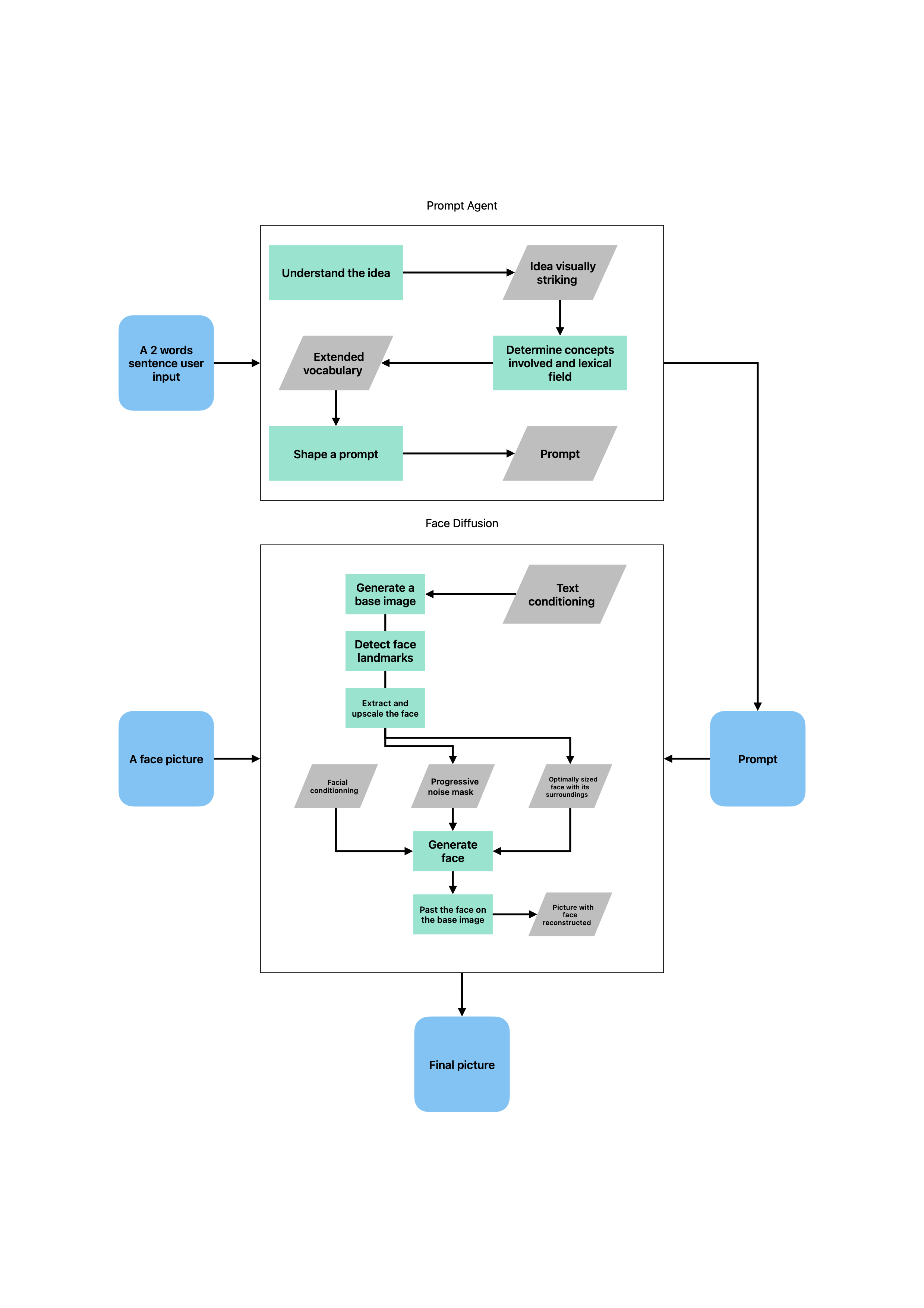 Complete generation pipeline: From 2-word user input to final artistic portrait via prompt agent and face diffusion
The system uses a multi-component architecture combining prompt enhancement, SDXL base generation, and differential diffusion face detailing:
Stage 1: Pure SDXL Base Generation with Dual-Path Conditioning Architecture
Stage 1 implements a conditioning pipeline that separates creative composition from identity constraints, establishing the artistic foundation before face-specific processing.
# AYS (Align Your Steps) timestep scheduling from NVIDIA
default_timesteps = [999, 845, 730, 587, 443, 310, 193, 116, 53, 13]
timesteps = loglinear_interp(default_timesteps, num_steps)

# PhotoMaker V2 LoRA fusion with SDXL base for portrait-focused generation
self._base_pipeline.load_lora_weights(state_dict["lora_weights"], adapter_name="photomaker")
self._base_pipeline.fuse_lora()

# Dual-Path Conditioning Architecture
conditioning = self.conditioning_service.prepare_conditioning(params)
Dual-Encoder Text Processing
The system implements a dual-encoder SDXL conditioning architecture that prepares both text-only and face-conditioned paths simultaneously:
class TextEncoder:
    def __init__(self, text_encoder_1: CLIPTextModel, text_encoder_2: CLIPTextModelWithProjection):
        # Dual CLIP encoders for SDXL text understanding

    def encode(self, prompt: str) -> Tuple[torch.Tensor, torch.Tensor]:
        # Tokenize with both CLIP tokenizers
        tokens_1 = self._tokenize(self.tokenizer_1, prompt)  # Standard CLIP
        tokens_2 = self._tokenize(self.tokenizer_2, prompt)  # CLIP with projection

        # Dual encoding with hidden state extraction
        output_1 = self.text_encoder_1(tokens_1, output_hidden_states=True)
        output_2 = self.text_encoder_2(tokens_2, output_hidden_states=True)

        # Combine last hidden states: [77, 768] + [77, 1280] = [77, 2048]
        detailed_embedding = torch.concat([
            output_1.hidden_states[-2],  # CLIP hidden states
            output_2.hidden_states[-2],  # CLIP-L hidden states
        ], dim=-1)

        # SDXL pooled embeddings for global conditioning
        global_embedding = output_2[0]  # [1280] pooled representation

        return detailed_embedding, global_embedding
CFG (Classifier-Free Guidance) Tensor Architecture
The conditioning pipeline creates precisely structured tensors for SDXL’s classifier-free guidance:
- Detailed Text:
[2, 77, 2048]- Combined CLIP embeddings (negative + positive) - Global Text:
[2, 1280]- SDXL pooled embeddings for style guidance - Spatial IDs:
[2, 6]- Precise spatial conditioning[height, width, crop_y, crop_x, target_h, target_w]
Strategic Conditioning Path Selection
# Stage 1: Pure text-driven generation (no face identity interference)
if current_step <= start_merge_step:  # Typically start_merge_step = 3
    current_detailed = conditioning.detailed_text      # Text-only path
    current_global = conditioning.global_text          # Pure SDXL creativity
    current_spatial = conditioning.spatial_ids         # Spatial composition control
else:
    # Stage 2 path (face-conditioned) - not used in base generation
    current_detailed = conditioning.detailed_text_face
    current_global = conditioning.global_text_face
UNet Denoising with Classifier-Free Guidance
The system implements SDXL’s denoising loop with dual conditioning and adaptive CFG mechanics:
# Latent space initialization: [N, 4, H//8, W//8]
latent_shape = (batch_size, 4, params.height // 8, params.width // 8)
latents = self._initialize_latents(latent_shape, seeds)

# CFG expansion for classifier-free guidance: [N, 4, H//8, W//8] → [2*N, 4, H//8, W//8]
latent_model_input = torch.cat([latents] * 2)

# UNet forward pass with SDXL dual conditioning architecture
noise_pred = self.unet.forward(
    sample=latent_model_input,
    timestep=timestep,
    encoder_hidden_states=current_detailed,  # [2*N, 77, 2048] CLIP embeddings
    added_cond_kwargs={
        "text_embeds": current_global,       # [2*N, 1280] pooled embeddings
        "time_ids": spatial_ids              # [2*N, 6] spatial conditioning
    }
)

# Tensor alignment validation ensures conditioning matches latent shapes
if latent_model_input.shape[0] != current_detailed.shape[0]:
    logger.error(f"CFG tensor mismatch: latents={latent_model_input.shape[0]}, conditioning={current_detailed.shape[0]}")

# Classifier-Free Guidance: split predictions into negative/positive components
noise_pred_uncond, noise_pred_text = noise_pred.chunk(2)  # [N, 4, H//8, W//8] each

# Adaptive guidance: CFG=0 in final 20% of steps for improved convergence
adaptive_guidance = guidance_scale if step < total_steps * 0.8 else 0.0

# CFG guidance formula: blend unconditional and conditional predictions
guided_noise = noise_pred_uncond + adaptive_guidance * (noise_pred_text - noise_pred_uncond)
This architecture creates a clean separation between creative composition (Stage 1) and identity preservation (Stage 2), while maintaining full compatibility with SDXL’s conditioning requirements. The dual-path design enables interpretable generation where each stage’s contribution can be isolated and optimized independently.
Stage 2: Differential Diffusion Face Detailing
The face refinement process uses progressive diffusion techniques:



Left to Right: Base SDXL generation → Progressive face mask → Final refined portrait with identity preservation
# Face detection and mask generation using InsightFace landmarks
face_coords = detect_faces(base_images)  # 1 face per image
face_crops = extract_and_magnify(face_coords, target_res=1024)
face_landmarks = extract_landmarks_insightface(face_crops)  # 106 facial landmarks
face_masks = generate_progressive_masks(face_landmarks, timesteps)

# Differential diffusion with precise face conditioning
masked_latents = vae_encode(face_crops)
refined_latents = differential_diffusion_loop(
    masked_latents, face_masks, face_conditioning, detailing_steps=20
)
refined_faces = vae_decode(refined_latents)
The progressive masking ensures identity preservation while allowing artistic style transformation in background regions, achieving precise control over which facial features retain original identity versus which adapt to the artistic prompt.
Custom Scheduler Implementation
Pre-Optimized Timestep Distribution
Standard diffusion schedulers use linear timestep spacing, but Narcis implements a custom logarithmic interpolation based on empirically optimized anchor points from generation/face_diffusion/core/scheduler.py:
class NoiseScheduler:
    """Production-optimized timestep scheduling for face generation."""

    def __init__(self, scheduler: SchedulerMixin):
        self.scheduler = scheduler
        # Empirically optimized anchor points for face generation quality
        self._default_timesteps = [999, 845, 730, 587, 443, 310, 193, 116, 53, 13]

    def set_timesteps(self, num_steps: int, device: torch.device) -> None:
        """Set custom timesteps using log-linear interpolation."""
        # Replace HuggingFace standard linear spacing with optimized curve
        timesteps = self._loglinear_interp(num_steps)
        self.scheduler.set_timesteps(
            num_inference_steps=None,
            timesteps=timesteps,
            device=device
        )

    def _loglinear_interp(self, num_steps: int) -> torch.Tensor:
        """Performs log-linear interpolation of timesteps (legacy compatibility)."""
        DEFAULT_TIMESTEPS = [999, 845, 730, 587, 443, 310, 193, 116, 53, 13]
        t_steps = DEFAULT_TIMESTEPS
        xs = np.linspace(0, 1, len(t_steps))
        ys = np.log(t_steps[::-1])
        new_xs = np.linspace(0, 1, num_steps)
        new_ys = np.interp(new_xs, xs, ys)
        interped_ys = np.exp(new_ys)[::-1].copy()
        return interped_ys
This custom scheduling replaces HuggingFace’s standard implementations with a curve specifically optimized for face generation quality.
Tensor Operations
CFG Conditioning Alignment for Batch Processing
The system implements tensor alignment for classifier-free guidance in batch scenarios:
# Custom conditioning pattern for batch CFG
# Standard: [neg1, pos1, neg2, pos2] - per-image interleaving
# Optimized: [neg1, neg2, pos1, pos2] - type-grouped for tensor efficiency

def align_conditioning_for_batch(conditioning, batch_size):
    negative_cond = conditioning[:batch_size]  # All negatives first
    positive_cond = conditioning[batch_size:]  # All positives second
    return torch.cat([negative_cond, positive_cond], dim=0)

# Enables efficient batch processing without tensor reshape overhead
Progressive Mask Broadcasting
Face detailing employs complex progressive masking across timesteps from generation/face_diffusion/services/detailing.py:445:
# CRITICAL: Progressive mask creation via broadcasting
# Create threshold progression from 0 to 1
total_time_steps = original_steps  # Use original steps value (matches legacy exactly)
thresholds = torch.arange(total_time_steps, dtype=mask_for_progressive.dtype) / total_time_steps
thresholds = thresholds.to(self.device)  # [timesteps]

# Remove the channel dimension: [batch_size, 1, H, W] → [batch_size, H, W]
mask_no_channel = mask_for_progressive.squeeze(1)  # [batch_size, H, W]

# Simple broadcasting: thresholds[timesteps] < mask[batch_size, H, W]
# Add dimensions for proper broadcasting: [timesteps, 1, 1, 1] < [1, batch_size, H, W]
# Result: [timesteps, batch_size, H, W]
mask = thresholds[:, None, None, None] < mask_no_channel[None, :, :, :]

# Applied during denoising loop for precise face region control
for i, timestep in enumerate(timesteps):
    # Get progressive mask for this timestep: masks[i] = [batch_size, H, W]
    current_mask = masks[i].unsqueeze(1)  # Add channel dimension
    mask_expanded = current_mask.repeat(1, 4, 1, 1)  # [N_faces, 4, 128, 128]
    noise_pred = noise_pred * mask_expanded  # Apply differential diffusion
Memory Architecture Engineering
Request Batching with Sequential Processing
To optimize GPU utilization while respecting memory constraints, the system implements request batching:
class RequestBatcher:
    def __init__(self, max_batch_size=4, timeout_seconds=0.5):
        self.max_batch_size = max_batch_size
        self.timeout = timeout_seconds

    async def collect_batch(self) -> List[FaceGenerationRequest]:
        # Collect requests until batch size or timeout
        # Process sequentially to avoid GPU memory conflicts
        batch = await self._await_batch_formation()
        results = []
        for request in batch:
            result = await self._process_single(request)
            results.append(result)
        return results
Model Registry & LoRA Integration
PhotoMaker V2 Memory-Optimized Loading
The system implements model loading with careful memory management from generation/face_diffusion/core/registry.py:86:
class ModelRegistry:
    """Manages PhotoMaker LoRA integration with memory optimization."""

    def load_photomaker(self, photomaker_path: str, insightface_path: str, device: str = "cuda", dtype: torch.dtype = torch.float16) -> None:
        """Load PhotoMaker and face analysis components."""
        logger.info(f"Loading PhotoMaker from: {photomaker_path}")

        # Load state dict
        state_dict = torch.load(photomaker_path, map_location="cpu")

        # Load ID encoder
        from .id_encoder import IDEncoder
        id_encoder = IDEncoder()
        id_encoder.load_state_dict(state_dict["id_encoder"], strict=True)
        id_encoder = id_encoder.to(device, dtype=dtype)

        # CRITICAL: Load LoRA weights using the existing pipeline (same as legacy approach)
        logger.info("Loading LoRA weights")
        self._base_pipeline.load_lora_weights(state_dict["lora_weights"], adapter_name="photomaker")
        self._base_pipeline.fuse_lora()

        # Delete pipeline after LoRA loading to free memory (like legacy does)
        del self._base_pipeline
        self._base_pipeline = None
        torch.cuda.empty_cache()  # Force CUDA memory cleanup

        # Add trigger word to tokenizers
        self.trigger_word = "img"
        self.tokenizer.add_tokens([self.trigger_word], special_tokens=True)
        self.tokenizer_2.add_tokens([self.trigger_word], special_tokens=True)
Face Identity Processing Pipeline
PhotoDaker identity preservation combines InsightFace analysis with custom token injection:
# From FaceEmbedder initialization in registry.py:118
self.face_embedder = FaceEmbedder(
    providers=["CUDAExecutionProvider", "CPUExecutionProvider"],
    allowed_modules=["detection", "recognition", "genderage", "landmark_2d_106"],
    root=insightface_path
)
self.face_embedder.prepare(ctx_id=0, det_size=(640, 640))
This architecture enables throughput optimization while maintaining stability under memory constraints.
Differential Diffusion Implementation
Tensor Operations for Face Refinement
The core differential diffusion implementation from generation/face_diffusion/services/detailing.py:311:
def _batch_differential_diffusion(
    self,
    magnified_faces: torch.Tensor,  # [N_faces, 3, target_res, target_res]
    mask_init: torch.Tensor,        # [N_faces, 1, target_res, target_res]
    conditioning: Conditioning,
    params: DetailingParams,
    seeds: List[torch.Generator],
    target_resolution: int
) -> torch.Tensor:
    """Critical Tensor Transformations:
    1. VAE Encoding: [N, 3, target_res, target_res] → [N, 4, target_res//8, target_res//8]
    2. Mask Processing: [N, 1, target_res, target_res] → [steps, N, target_res//8, target_res//8]
    3. Progressive Masking: Gradual face region exposure across timesteps
    4. CFG Expansion: [N, 4, H//8, W//8] → [2*N, 4, H//8, W//8]
    5. UNet Processing: Noise prediction with face conditioning
    """

    # Encode faces to latent space
    init_latents = self.vae_processor.encode(magnified_faces * 2 - 1, seeds)

    # Process masks for latent space (CRITICAL: preserve 4D for interpolation)
    vae_scale_factor = 8
    latent_resolution = target_resolution // vae_scale_factor
    mask_resized = torch.nn.functional.interpolate(
        mask_init,  # Keep original 4D mask for interpolation
        size=(latent_resolution, latent_resolution),
        mode='bilinear', align_corners=False, antialias=None
    )

    # Batch denoising loop with progressive differential masking
    latents = self._denoising_loop(
        conditioning, timesteps, original_noise_desc, progressive_masks, guidance_scale, seeds
    )

    return self.vae_processor.decode(latents)
Technical Summary
- Custom Diffusion Mathematics: Pre-optimized timestep scheduling with empirical anchor points (
[999, 845, 730, 587, 443, 310, 193, 116, 53, 13]) - PhotoMaker V2 Integration: Memory-optimized LoRA fusion with explicit pipeline cleanup and trigger word injection
- Progressive Masking: Tensor broadcasting for gradual face region exposure across timesteps
- Differential Diffusion: Face-specific refinement with latent space masking and CFG alignment
- Production Memory Management: Explicit CUDA cache cleanup and component lifecycle optimization
The implementation uses custom solutions where standard approaches are insufficient for production requirements. The emphasis on interpretable pipeline stages, deterministic tensor operations, and memory optimization aligns with building reliable, steerable AI systems.
Page 3: Production Operations & Web Platform
Discord Bot Operations Interface
The Discord bot serves as the primary operations interface for production ML workflows, providing a set of tools as parameters tuning and batched production generations
Production Generation Commands
# Unified parameter management with validation
@commands.slash_command(description="Set generation parameters")
async def set(self, inter, parameter: str, value: str):
    """Set individual parameters with autocomplete and validation"""
    # Parameter definitions with types and validation
    PARAMETER_DEFINITIONS = {
        "guidance_scale": {"type": float, "min": 1.0, "max": 30.0},
        "steps": {"type": int, "min": 1, "max": 150},
        "weight": {"type": float, "min": 0.0, "max": 2.0},
        "production_mode": {"type": bool}
    }

# Face testing with Mecene ideas
@commands.slash_command(description="Test faces with Mecene-enhanced inputs")
async def test_face_mecene(self, inter, face_folders: str, generations_per_input: int = 3):
    """Generate test portraits using faces and mecene idea categories"""
    # Executes face_folders × mecene_ideas × generations_per_input
    await self._execute_face_test_session(face_folders, generations_per_input)

# Parameter sweep for batch testing
@commands.slash_command(description="Run parameter sweep using YAML configuration")
async def sweep(self, inter, config: str):
    """Execute parameter combinations for systematic testing"""
    sweep_config = yaml.safe_load(config)
    combinations = self._generate_parameter_combinations(sweep_config)
Production Operations Interface
- Live progress tracking with Discord message updates
- Parameter validation and autocomplete for safe operations
- Production artifact management with save/discard controls (💾 reactions)
- Batch generation coordination across face folders and mecene ideas
Remix React Web Platform
The web application uses Remix framework with server-side rendering, providing a performant user interface with integrated caching and session management.
Session Management with PostgreSQL
// PostgreSQL-backed session repository with Prisma ORM
export class PostgresSessionRepository implements SessionRepository {
    async create(data: SessionCreateData = {}): Promise<string> {
        const session = await prisma.session.create({
            data: {
                tokens: data.tokens ?? Number(process.env.TOKEN_COUNT_FOR_GUESTS || '5'),
                expiresAt: data.expiresAt ?? new Date(Date.now() + 1000 * 60 * 60 * 24 * 7) // 7 days
            }
        })
        return session.id
    }

    async linkUser(sessionId: string, userId: string): Promise<void> {
        // Transfer anonymous tokens to user account
        const session = await this.findById(sessionId)
        const user = await prisma.user.findUnique({ where: { id: userId } })
        const totalTokens = session.tokens + user.tokens

        await Promise.all([
            this.update(sessionId, { userId, tokens: 0 }),
            prisma.user.update({ where: { id: userId }, data: { tokens: totalTokens } })
        ])
    }
}
Global Unified Cache System
// PhotoWall component with unified metadata and image caching
declare global {
    var photoWallCache: {
        celebrityPhotos: Map<string, Photo[]>
        availableCelebrities: Celebrity[]
        lastUpdated: number
        imageStats: {
            totalImages: number
            totalSizeBytes: number
            imagesLoaded: number
        }
    }
}

// Unified cache with both metadata and image buffers
interface Photo {
    id?: string
    image?: string
    text: string
    // Image cache data unified with metadata
    buffer?: Buffer
    contentType?: string
    etag?: string
    size?: number
}
PhotoWall Gallery Component
The PhotoWall component creates an infinite-scroll portrait gallery using the global cache system:

// Multi-column infinite scroll with seamless looping
export async function getPhotoWallColumns() {
    // Verify global cache is loaded
    if (global.photoWallCache.celebrityPhotos.size === 0) {
        await loadPhotowallData() // Emergency reload if needed
    }

    // Random celebrity selection from cached list
    const randomCelebrity = getRandomCelebrity()
    const photosToUse = getCachedCelebrityPhotos(randomCelebrity.id)

    // Create seamless loop: double the photos for infinite scroll
    const columnLength = Math.ceil(photosToUse.length / numberOfColumns) * 2
    return Array.from({length: numberOfColumns}, (_, i) => {
        const columnPhotos = shuffledPhotos.slice(i * (columnLength / 2), (i + 1) * (columnLength / 2))
        return [...columnPhotos, ...columnPhotos] // Duplicate for seamless loop
    })
}
Gallery Features
- Multi-column animated layout with smooth transitions
- Each image displays mecene keyword captions (e.g., “ethereal beauty”, “corporate confidence”)
- Celebrity rotation system showing different faces on each page load
- Unified cache enables instant loading without S3 requests
- Responsive design adapting to screen sizes
Production Data Pipeline
Objects Workflow Architecture
The system implements a structured data flow from Discord operations through S3 storage to web display:
faces/ → productions/ → photowall/ → curated/
  ↓         ↓            ↓           ↓
Test      Discord       Web         Public
Faces     Outputs       Cache       Gallery
Discord Bot → S3 Productions
- Face test sessions generate metadata with
mecene_inputkeywords - Approved images (💾 reactions) include
saved_from_messagefield - Structured metadata with celebrity identification and generation parameters
- Automatic S3 sync preserving Discord session context
S3 Productions → PhotoWall Cache
- Global server-level cache preloads all photowall images on startup
- Unified cache stores both metadata and image buffers for performance
- Emergency cache reload capability for production resilience
- SEO-optimized filename generation from celebrity names and mecene keywords
Mecene Prompt Enhancement Pipeline
# LangGraph multi-stage prompt generation
@langGraph.workflow
class MeceneAgent:
    def generate_idea(self, input: str) -> str:
        """Transform 2-word input into 50-word portrait concept"""

    def generate_meta_keywords(self, idea: str) -> MetaKeywords:
        """Extract keywords across 8 categories: themes, colors, styles,
           mediums, subjects, emotions, time, places"""

    def choose_keywords(self, meta: MetaKeywords) -> str:
        """Select 15 most relevant keywords for SDXL generation"""

# Integration with Discord bot workflow
mecene_output = await mecene_service.enhance_prompt("corporate confidence")
generation_params = {
    "prompt": mecene_output,
    "face_folder": "test-face",
    "guidance_scale": 7.5
}
Native CloudWatch Cost Optimization
Centralized Logging Without Third-Party Services
- All services use CloudWatch Logs with structured JSON formatting
- Log retention policies automatically manage storage costs (7-day ALB logs, 30-day application logs)
- Native AWS monitoring eliminates external observability tool licensing costs
- CloudWatch Metrics drive all auto-scaling decisions
Simple Production Monitoring
- CloudWatch Logs collect all service logs with structured JSON formatting
- Log retention policies manage storage costs (7-day ALB access logs, 30-day application logs)
- ECS health checks and ALB health checks provide service availability monitoring
- Native AWS cost tracking through billing APIs and Cost Explorer integration
Development and Debugging
- Remix SSR provides server-side error tracking and performance insights
- PhotoWall cache statistics available through
getCacheStats()for debugging - Discord bot provides real-time generation monitoring and manual intervention capabilities
- S3 objects workflow enables production data inspection and troubleshooting
This production operations architecture: Discord serves as the primary operations interface, Remix provides the user-facing platform, and CloudWatch handles all observability needs without external dependencies.
Conclusion
This technical writeup shows the transition from Infrastructure Expert → ML Systems Engineering, showing how distributed systems expertise provides the foundation for building production AI systems. The three-page structure illustrates this progression: container orchestration foundations (Page 1) enabling ML pipeline engineering (Page 2) that powers real production operations (Page 3).
Technical Journey Across Three Domains:
Page 1 covered container orchestration - ECS service mesh architecture, multi-tier capacity providers, and AWS resource orchestration patterns that provide the reliability foundation for ML workloads.
Page 2 covered ML engineering - custom differential diffusion implementations, and PhotoMaker identity preservation that go beyond standard framework usage.
Page 3 covered production operations - Discord bot command interfaces, Remix web platform integration, and PostgreSQL session management for user-facing AI systems.
Production System Impact:
- Living system at narcis.ai serving real users in production
- 237 commits, 47,036 lines of code across Python ML pipelines, TypeScript services, and Terraform infrastructure
- Cost-optimized architecture achieving 70%+ savings through spot instance strategies and maximizing free-tier usage
- Real-time operations interface via Discord bot with production artifact management
Infrastructure + AI: Unified Disciplines
The system shows that infrastructure and machine learning are not separate domains - they are unified disciplines requiring the same foundational knowledge in reliability, scalability, and operational practices. Understanding distributed systems, cost optimization, and deployment automation extends to ML workloads, where the same principles of interpretability, observability, and graceful degradation are required for building AI systems that are safe, beneficial, and understandable.
This positions infrastructure expertise as the foundation for developing production AI systems that prioritize reliability, interpretability, and steerable behavior - core requirements for safe and beneficial AI deployment at scale.